
2.7 KiB
2.7 KiB
Agent Evaluation
EvalScope's Agent Evaluation lets either the model itself or an off-the-shelf agent CLI complete an evaluation sample inside a controlled multi-turn tool-use loop. The full interaction is recorded for step-by-step replay in the Web UI.
Two modes
| Mode | When to use | Docs |
|---|---|---|
| Native AgentLoop | Wrap a regular benchmark (GSM8K, AIME, SWE-bench, …) in a tool-use loop to evaluate the model's own tool-use ability | Native AgentLoop Mode |
| External Agent Bridge | Evaluate Claude Code / Codex / OpenCode / Gemini CLI / Hermes and similar off-the-shelf agent CLIs; EvalScope forwards the CLI's LLM traffic to your evaluation model | External Agent Bridge Mode |
Both modes are configured through TaskConfig.agent_config. A single evaluation picks exactly one mode.
Trace visualization
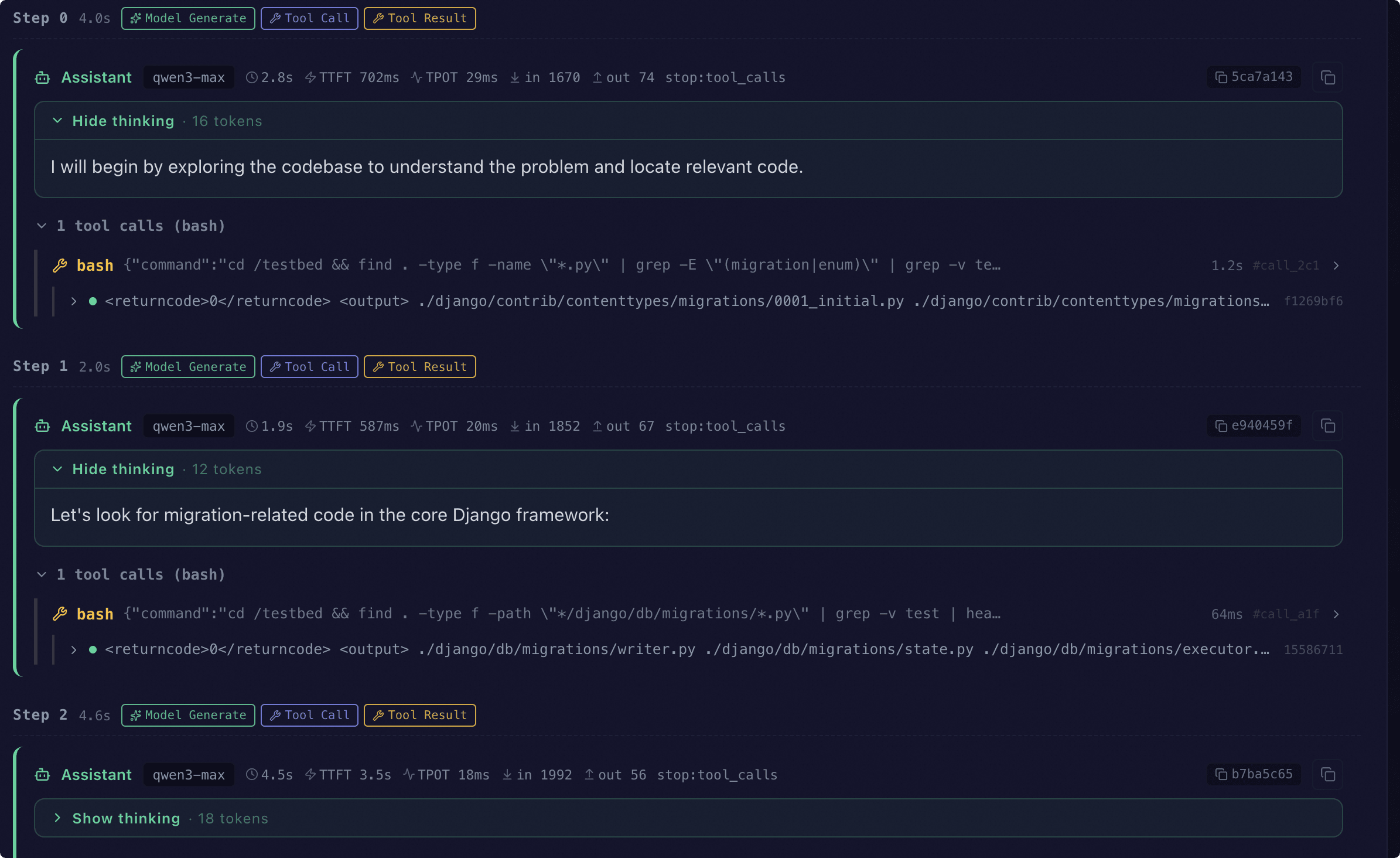
With Agent Evaluation enabled, every sample carries a trace. The Web UI replays the full interaction step by step:
- Start the web service:
evalscope service --outputs ./outputs. - Open the dashboard, select the target report and go to Single-model details → Predictions.
- When a trace is detected, the UI renders the Agent Trace view grouped by
step.
In chronological order the view shows:
- The model's reply at each step (reasoning, latency, token usage)
- Tool calls and their observations (multiple calls within one step are grouped)
- Sandbox commands (bash, python_exec, or the external CLI's actual command line)
- System reminders and errors (nudges when the model fails to call a tool, plus parse / tool-execution errors)
For the Web dashboard in general (report comparison, predictions view, …), see [Visualization](../../get_started/visualization.md).
FAQ
When should I set agent_config, and when should I rely on a benchmark's built-in AgentLoop?
- To turn a regular benchmark (GSM8K, AIME, IFEval, HLE, …) into a multi-turn tool-use task → set
AgentConfigorExternalAgentConfigonTaskConfig.agent_config. - For intrinsically agentic benchmarks (SWE-bench agentic, Terminal-Bench, …) → just run the dataset and tune
dataset_args.extra_params. Do not setagent_config; it is ignored. - Benchmarks like
swe_bench_proship their own per-sample environment and can be combined with the External Agent Bridge — just leaveenvironmentempty.
For mode-specific issues, see each sub-page: Native AgentLoop FAQ · External Agent Bridge FAQ.
:hidden:

native.md
bridge.md