13274243a0
Keep K3 suite selection and report-schema scoring in bash, merge K3/vision dataset_args into dpv4 yamls, and pin EvalScope at 735d920ee911 with local patches.

Co-authored-by: Cursor <cursoragent@cursor.com>
24 KiB
Examples
This page walks through copy-pasteable commands in the order of target → input data → request parameters → load pattern → observing results. For the full parameter reference see Parameters; for multi-turn scenarios see Multi-turn Conversation Benchmark.
Local Model Inference
Both local transformers inference and vLLM inference (vllm must be installed first) are supported, and neither needs --url. --model accepts a ModelScope model name such as Qwen/Qwen2.5-0.5B-Instruct, or a direct path to model weights such as /path/to/model_weights.
transformers inference: pass --api local.
evalscope perf \
  --model 'Qwen/Qwen2.5-0.5B-Instruct' \
  --number 20 \
  --parallel 2 \
  --api local \
  --dataset openqa
Optionally add --attn-implementation, choosing from flash_attention_2, eager, or sdpa.
vLLM inference: pass --api local_vllm.
evalscope perf \
  --model 'Qwen/Qwen2.5-0.5B-Instruct' \
  --number 20 \
  --parallel 2 \
  --api local_vllm \
  --dataset openqa
Input Construction
Fixed Prompt
Use --prompt to send one fixed prompt for every request, with no dataset involved.
evalscope perf \
  --url 'http://127.0.0.1:8000/v1/chat/completions' \
  --parallel 2 \
  --model 'qwen2.5' \
  --log-every-n-query 10 \
  --number 20 \
  --api openai \
  --temperature 0.9 \
  --max-tokens 1024 \
  --prompt 'Write a science fiction story, please begin your performance'
You can also read it from a local file with the @ prefix:
evalscope perf \
  --url 'http://127.0.0.1:8000/v1/chat/completions' \
  --parallel 2 \
  --model 'qwen2.5' \
  --log-every-n-query 10 \
  --number 20 \
  --api openai \
  --temperature 0.9 \
  --max-tokens 1024 \
  --prompt @prompt.txt
Random Dataset
Randomly generate prompts based on prefix-length, max-prompt-length, and min-prompt-length. It is necessary to specify tokenizer-path. The number of tokens in the generated prompt is uniformly distributed between prefix_length + min-prompt-length and prefix_length + max-prompt-length. In a single test, all requests have the same prefix portion.
Due to the influence of chat_template and tokenization algorithms, there may be some discrepancies in the number of tokens in the generated prompts, and it is not an exact specified token count.
evalscope perf \
  --parallel 20 \
  --model Qwen2.5-0.5B-Instruct \
  --url http://127.0.0.1:8801/v1/chat/completions \
  --api openai \
  --dataset random \
  --min-tokens 128 \
  --max-tokens 128 \
  --prefix-length 64 \
  --min-prompt-length 1024 \
  --max-prompt-length 2048 \
  --number 100 \
  --tokenizer-path Qwen/Qwen2.5-0.5B-Instruct \
  --debug
To ensure the server receives exactly the configured number of tokens, add `--tokenize-prompt`. This flag tokenizes the prompt into a token-ID list on the client side and sends it directly via the `prompt` field of `/v1/completions`, bypassing server-side re-tokenization.

The server will receive exactly `prefix_length + inner_seq_length` tokens, which falls within `[min-prompt-length, max-prompt-length]`. Compatible with vLLM, SGLang, LMDeploy, and other frameworks that accept token-ID input; not supported for the `random_vl` dataset.
Random Multimodal Dataset
Use the random_vl dataset to randomly generate image and text inputs. Based on the random dataset, it adds image-related parameters (image-width, image-height, image-format, image-num).
evalscope perf \
  --parallel 20 \
  --model Qwen2.5-VL-3B-Instruct \
  --url http://127.0.0.1:8801/v1/chat/completions \
  --api openai \
  --dataset random_vl \
  --min-tokens 128 \
  --max-tokens 128 \
  --prefix-length 0 \
  --min-prompt-length 100 \
  --max-prompt-length 100 \
  --image-width 512 \
  --image-height 512 \
  --image-format RGB \
  --image-num 1 \
  --number 100 \
  --tokenizer-path Qwen/Qwen2.5-VL-3B-Instruct \
  --debug
Long-context Prefix Injection
To benchmark 128K/256K-scale long contexts with real text, the random dataset gives you a fixed length but only high-entropy meaningless tokens, which cannot reproduce real characteristics such as prefix-cache hit rates or MTP acceptance rates. Real instruction datasets, on the other hand, are mostly 4K-8K tokens, so setting target_input_len to 128K either filters everything out or leaves lengths uneven.
prefix_file solves this: point it at a long text corpus (a book, documentation, a code base, etc.) and the framework slices it to exactly target_input_len − prompt length tokens and prepends it to each short prompt, so every request's input hits the target length while keeping the low-entropy character of real human language. See Long-context Prefix Injection for the parameter reference.
Inject the prefix as the system role (recommended, matching real RAG traffic):
evalscope perf \
  --parallel 4 \
  --model Qwen2.5-0.5B-Instruct \
  --url http://127.0.0.1:8801/v1/chat/completions \
  --api openai \
  --dataset openqa \
  --tokenizer-path Qwen/Qwen2.5-0.5B-Instruct \
  --dataset-args '{"target_input_len": 8192, "prefix_file": "long_text.txt", "prefix_role": "system"}' \
  --max-tokens 128 \
  --number 20
Each request is built as [{"role": "system", "content": "<long prefix>"}, {"role": "user", "content": "<original question>"}], and the Input Tokens reported by the server are identical across requests (avg = p50 = p99 = max), which makes it easy to benchmark a single length point.
Prepend the prefix to the user message: set prefix_role to user and the prefix is prepended directly to the user question, producing a single user message. Useful when you do not want to introduce a system role.
evalscope perf \
  --parallel 2 \
  --model Qwen2.5-0.5B-Instruct \
  --url http://127.0.0.1:8801/v1/chat/completions \
  --api openai \
  --dataset openqa \
  --tokenizer-path Qwen/Qwen2.5-0.5B-Instruct \
  --dataset-args '{"target_input_len": 131072, "prefix_file": "long_text.txt", "prefix_role": "user"}' \
  --number 10
**Practical notes**

- **Preparing the prefix corpus**: any UTF-8 plain-text file works. When the corpus has fewer tokens than the budget it is automatically repeated (tiled) with a warning — to avoid repetition entirely, use a corpus with more tokens than `target_input_len`.
- **Stay under the server limit**: `target_input_len` must be smaller than the server's `max_model_len` (adjustable via `--max-model-len` in vLLM), otherwise requests are rejected. Note that the chat template itself also consumes a dozen or so extra tokens.
- **Supported datasets**: `openqa`, `longalpaca`, `line_by_line` (plain-text lines only), and ShareGPT (`share_gpt_zh` / `share_gpt_en`); all require `--tokenizer-path`. ShareGPT budgets against the whole conversation, so a conversation already longer than `target_input_len` is skipped entirely.
- **Not compatible with `drop`**: `prefix_file` and `input_len_mode="drop"` are mutually exclusive (`drop` only keeps prompts that already fill the target, leaving a zero prefix budget) and the combination is rejected at config time; use the default `cap` and let the prefix fill the rest.
- **Prefix-cache effect**: all requests share the same prefix head, so re-running the same configuration shows a clear TTFT drop (the engine hits its prefix cache). Conversely, to measure **cache-free** cold-start performance, use the `random` dataset instead (its `--dataset-offset` mechanism keeps prompts distinct across runs).
- **`/v1/completions` endpoint**: this endpoint does not apply a chat template, so `prefix_role="system"` automatically falls back to plain-text concatenation with a warning; the prefix and prompt then sit directly adjacent and tokens may merge or split across the join, making the measured total differ from the target by about ±1 token (the same applies to `prefix_role="user"`; see "Join boundary" in the [parameter reference](./parameters.md#long-context-prefix-injection)).
Request Configuration
Generation Parameters and Timeouts
Combine stop, stream, temperature, and read/connect timeouts:
evalscope perf \
  --url 'http://127.0.0.1:8000/v1/chat/completions' \
  --parallel 2 \
  --model 'qwen2.5' \
  --log-every-n-query 10 \
  --read-timeout 120 \
  --connect-timeout 120 \
  --number 20 \
  --max-prompt-length 128000 \
  --min-prompt-length 128 \
  --api openai \
  --temperature 0.7 \
  --max-tokens 1024 \
  --stop '<|im_end|>' \
  --dataset openqa \
  --stream
Custom Request Body
Use --query-template to define the complete request-body JSON, where %m and %p are replaced by the model name and the prompt:
evalscope perf \
  --url 'http://127.0.0.1:8000/v1/chat/completions' \
  --parallel 2 \
  --model 'qwen2.5' \
  --log-every-n-query 10 \
  --read-timeout 120 \
  --connect-timeout 120 \
  --number 20 \
  --max-prompt-length 128000 \
  --min-prompt-length 128 \
  --api openai \
  --query-template '{"model": "%m", "messages": [{"role": "user","content": "%p"}], "stream": true, "skip_special_tokens": false, "stop": ["<|im_end|>"], "temperature": 0.7, "max_tokens": 1024}' \
  --dataset openqa
For longer templates, write the JSON to a local file and reference it with the @ prefix:
:caption: template.json

{
   "model":"%m",
   "messages":[
      {
         "role":"user",
         "content":"%p"
      }
   ],
   "stream":true,
   "skip_special_tokens":false,
   "stop":[
      "<|im_end|>"
   ],
   "temperature":0.7,
   "max_tokens":1024
}
evalscope perf \
  --url 'http://127.0.0.1:8000/v1/chat/completions' \
  --parallel 2 \
  --model 'qwen2.5' \
  --log-every-n-query 10 \
  --read-timeout 120 \
  --connect-timeout 120 \
  --number 20 \
  --max-prompt-length 128000 \
  --min-prompt-length 128 \
  --api openai \
  --query-template @template.json \
  --dataset openqa
Load Patterns
Warmup
Send a batch of warmup requests before the formal benchmark to eliminate cold-start effects (e.g. KV-cache filling, JIT compilation, connection pool initialization) and produce more accurate performance metrics.
Warmup requests are sent with the same concurrency and rate as the benchmark but excluded from performance metrics (latency, throughput, percentiles, etc.).
In closed-loop mode warmup has a second, equally important job: it absorbs the burst that occurs when the run starts. Without warmup the first --parallel requests are all released at the same instant against an idle server, so they queue behind one another's prefill and report a TTFT that never recurs later in the run. Warmup requests take that hit instead, and the dispatcher hands the concurrency slots over to the measured requests without draining them first — each warmup completion releases exactly one measured request into a server that is already busy. The first measured request therefore already faces a fully loaded server. That is what decides whether the percentiles can be trusted: without warmup, the inflated TTFT of those first --parallel requests enters the same percentile calculation as the normal ones, so whenever --parallel / --number exceeds 1% the reported p99 is decided by that opening batch alone.
That hand-over only works while every concurrency slot is held by a warmup request, so --warmup-num should be at least --parallel in closed-loop mode; when the value is too small the run logs a warning naming the value to pass. Use a larger one (for example 2 × --parallel) if the server also has a genuinely cold start to absorb, or if you read the max column of the percentile table as well.
Absolute count mode: set --warmup-num to an integer >= 1, the exact number of warmup requests.
evalscope perf \
  --url 'http://127.0.0.1:8000/v1/chat/completions' \
  --parallel 10 \
  --model 'qwen2.5' \
  --number 100 \
  --warmup-num 10 \
  --api openai \
  --dataset openqa \
  --stream
The above command sends 10 warmup requests first, then 100 benchmark requests. Metrics are computed only from the latter 100 requests.
Ratio mode: set --warmup-num to a float between 0 and 1 to compute the warmup count as a proportion of --number. This is especially useful for sweep mode where each run has a different --number.
evalscope perf \
  --url 'http://127.0.0.1:8000/v1/chat/completions' \
  --parallel 10 \
  --model 'qwen2.5' \
  --number 100 \
  --warmup-num 0.1 \
  --api openai \
  --dataset openqa \
  --stream
--warmup-num 0.1 means the warmup count is 10% of --number, i.e. max(1, int(0.1 * 100)) = 10 warmup requests.
**Important Notes**

- Warmup requests use the same dataset and request parameters as the benchmark.
- A separate progress bar is displayed during warmup (`Warmup[...]`) alongside the benchmark bar (`Processing[...]`). In closed-loop mode the two overlap briefly, because the trailing warmup responses arrive after the first measured requests have already been dispatched.
- `--duration` is anchored on the moment the first measured request is sent, so warmup does not consume the timed budget.
- In multi-turn mode, `--warmup-num` specifies the number of warmup conversations (consistent with the `--number` semantics); all turns within a warmup conversation are excluded from metrics. The `--parallel` guidance above applies to closed-loop single-turn runs; open-loop paces dispatch by arrival rate and multi-turn counts conversations rather than requests.
Open-loop Mode
In open-loop mode, requests are dispatched immediately following a Poisson arrival schedule (controlled by --rate), without waiting for the server to return responses. This models realistic traffic patterns where arrivals are independent of service time. By specifying multiple rate values in a single command, you can automatically sweep the throughput-latency curve.
The following example runs three independent benchmark rounds at 5, 10, and 20 req/s, sending 500, 1000, and 2000 requests respectively, to observe how latency and throughput change under different loads:
evalscope perf \
  --url 'http://127.0.0.1:8000/v1/chat/completions' \
  --model 'qwen2.5' \
  --api openai \
  --dataset openqa \
  --open-loop \
  --rate 5 10 20 \
  --number 500 1000 2000 \
  --max-tokens 1024 \
  --stream
**Important Notes**

- All `--rate` values must be **> 0**; `rate=-1` (unlimited) is not supported in open-loop mode.
- `--number` and `--rate` must have the **same length**; each `(rate, number)` pair corresponds to one independent benchmark run.
- `--parallel` is **ignored** in open-loop mode (internally set to INF); no need to specify it.
- Since concurrency is unbounded, a high rate may cause a large number of in-flight requests to accumulate if the server cannot keep up. Set rate limits according to your server's capacity.
- Core difference from closed-loop (default) mode: closed-loop workers wait for a response before sending the next request (backpressure protection); open-loop fires requests on schedule without waiting (closer to real traffic).
Production Traffic Replay
The workload_trace dataset replays recorded production traffic verbatim following its original arrival timing, closely matching real-world load — bursty arrivals, heterogeneous request shapes, and multi-model routing that synthetic datasets (random, openqa, etc.) cannot reproduce. It builds on open-loop scheduling, but arrival times come from the trace's timestamp field, so no --rate is needed.
Prepare a JSONL trace file (one request record per line); field reference is in Parameters · Production Traffic Replay:
{"body": {"model": "qwen-plus", "messages": [{"role": "user", "content": "hello"}]}, "timestamp": 1700000000.0}
{"body": {"model": "qwen-max", "messages": [{"role": "user", "content": "write a poem"}]}, "timestamp": 1700000001.5, "request_id": "req-42"}
Basic replay: replay the whole trace verbatim following the original timestamps.
evalscope perf \
  --dataset workload_trace \
  --dataset-path trace.jsonl \
  --url http://127.0.0.1:8000/v1/chat/completions \
  --open-loop
Speed-up + model mapping: replay at 2× rate, map gpt-4 in the trace to a local qwen-max, and match the recorded output lengths (requires ignore_eos support, e.g. vLLM).
evalscope perf \
  --dataset workload_trace \
  --dataset-path trace.jsonl \
  --url http://127.0.0.1:8000/v1/chat/completions \
  --open-loop \
  --dataset-args '{"speed": 2.0, "model_mapping": {"gpt-4": "qwen-max"}, "match_output_length": true}'
Replay only the first 500 records: truncate with --number.
evalscope perf \
  --dataset workload_trace \
  --dataset-path trace.jsonl \
  --url http://127.0.0.1:8000/v1/chat/completions \
  --open-loop \
  --number 500
**Important Notes**

- **Open-loop only**: `--open-loop` is required, otherwise it raises an error.
- **`--model` is optional and does not rewrite the body**: each request keeps its own `model` (multi-model routing is preserved). To rewrite models, use `model_override` (replace all) or `model_mapping` (remap by name) via `--dataset-args`.
- **`--number` is optional**: omit to replay all records, or pass it to truncate to the first N.
- **Timestamps must be monotonically non-decreasing**: epoch numbers or ISO-8601 strings are accepted; out-of-order records trigger a warning and are sorted by timestamp.
- Use `--name` to set a meaningful output directory name (without `--model`, the directory name defaults to the dataset name).
Embedding and Rerank
Embedding Models
Use openai_embedding API mode and the random_embedding dataset. When using the random dataset, you need to specify tokenizer-path to generate queries of the specified length.
evalscope perf \
  --parallel 2 \
  --number 10 \
  --model 'text-embedding-v4' \
  --url 'https://dashscope.aliyuncs.com/compatible-mode/v1/embeddings' \
  --api-key ${DASHSCOPE_API_KEY} \
  --api openai_embedding \
  --dataset random_embedding \
  --min-prompt-length 256 \
  --max-prompt-length 256 \
  --tokenizer-path 'Qwen/Qwen3-Embedding-0.6B'
Rerank Models
Use openai_rerank API mode and the random_rerank dataset. When using the random dataset, you need to specify tokenizer-path to generate queries of the specified length.
You can specify data generation parameters through extra-args:
num_documents: number of documents per querydocument_length_ratio: document length multiplier relative to query length
evalscope perf \
  --parallel 2 \
  --number 10 \
  --model 'qwen3-rerank' \
  --url 'https://dashscope.aliyuncs.com/compatible-api/v1/reranks' \
  --api-key ${DASHSCOPE_API_KEY} \
  --api openai_rerank \
  --dataset random_rerank \
  --min-prompt-length 256 \
  --max-prompt-length 256 \
  --tokenizer-path 'Qwen/Qwen3-Embedding-0.6B' \
  --extra-args '{"num_documents": 5, "document_length_ratio": 3}'
Debugging Requests
Use the --debug option to output the requests and responses.
Non-stream mode output example
2024-11-27 11:25:34,161 - evalscope - http_client.py - on_request_start - 116 - DEBUG - Starting request: <TraceRequestStartParams(method='POST', url=URL('http://127.0.0.1:8000/v1/completions'), headers=<CIMultiDict('Content-Type': 'application/json', 'user-agent': 'modelscope_bench', 'Authorization': 'Bearer EMPTY')>)>
2024-11-27 11:25:34,163 - evalscope - http_client.py - on_request_chunk_sent - 128 - DEBUG - Request sent: <method='POST',  url=URL('http://127.0.0.1:8000/v1/completions'), truncated_chunk='{"prompt": "hello", "model": "qwen2.5"}'>
2024-11-27 11:25:38,172 - evalscope - http_client.py - on_response_chunk_received - 140 - DEBUG - Request received: <method='POST',  url=URL('http://127.0.0.1:8000/v1/completions'), truncated_chunk='{"id":"cmpl-a4565eb4fc6b4a5697f38c0adaf9b70b","object":"text_completion","created":1732677934,"model":"qwen2.5","choices":[{"index":0,"text":",everyone!今天我给您撒个谎哦。 ))\\n\\n今天开心的事。","logprobs":null,"finish_reason":"length","stop_reason":null,"prompt_logprobs":null}],"usage":{"prompt_tokens":1,"total_tokens":17,"completion_tokens":16}}'>
stream mode output example
2024-11-27 20:02:24,760 - evalscope - http_client.py - _handle_stream - 57 - DEBUG - Response recevied: data: {"model":"Qwen2.5-0.5B-Instruct","object":"chat.completion.chunk","choices":[{"index":0,"delta":{"content":"重要的"},"finish_reason":null}],"usage":null}
2024-11-27 20:02:24,803 - evalscope - http_client.py - _handle_stream - 57 - DEBUG - Response recevied: data: {"model":"Qwen2.5-0.5B-Instruct","object":"chat.completion.chunk","choices":[{"index":0,"delta":{"content":""},"finish_reason":null}],"usage":null}
2024-11-27 20:02:24,847 - evalscope - http_client.py - _handle_stream - 57 - DEBUG - Response recevied: data: {"model":"Qwen2.5-0.5B-Instruct","object":"chat.completion.chunk","choices":[{"index":0,"delta":{"content":",以便"},"finish_reason":null}],"usage":null}
2024-11-27 20:02:24,890 - evalscope - http_client.py - _handle_stream - 57 - DEBUG - Response recevied: data: {"model":"Qwen2.5-0.5B-Instruct","object":"chat.completion.chunk","choices":[{"index":0,"delta":{"content":"及时"},"finish_reason":null}],"usage":null}
2024-11-27 20:02:24,933 - evalscope - http_client.py - _handle_stream - 57 - DEBUG - Response recevied: data: {"model":"Qwen2.5-0.5B-Instruct","object":"chat.completion.chunk","choices":[{"index":0,"delta":{"content":"得到"},"finish_reason":null}],"usage":null}
2024-11-27 20:02:24,976 - evalscope - http_client.py - _handle_stream - 57 - DEBUG - Response recevied: data: {"model":"Qwen2.5-0.5B-Instruct","object":"chat.completion.chunk","choices":[{"index":0,"delta":{"content":"帮助"},"finish_reason":null}],"usage":null}
2024-11-27 20:02:25,023 - evalscope - http_client.py - _handle_stream - 57 - DEBUG - Response recevied: data: {"model":"Qwen2.5-0.5B-Instruct","object":"chat.completion.chunk","choices":[{"index":0,"delta":{"content":"和支持"},"finish_reason":null}],"usage":null}
2024-11-27 20:02:25,066 - evalscope - http_client.py - _handle_stream - 57 - DEBUG - Response recevied: data: {"model":"Qwen2.5-0.5B-Instruct","object":"chat.completion.chunk","choices":[{"index":0,"delta":{"content":""},"finish_reason":null}],"usage":null}
2024-11-27 20:02:25,109 - evalscope - http_client.py - _handle_stream - 57 - DEBUG - Response recevied: data: {"model":"Qwen2.5-0.5B-Instruct","object":"chat.completion.chunk","choices":[{"index":0,"delta":{"content":""},"finish_reason":null}],"usage":null}
2024-11-27 20:02:25,111 - evalscope - http_client.py - _handle_stream - 57 - DEBUG - Response recevied: data: {"model":"Qwen2.5-0.5B-Instruct","object":"chat.completion.chunk","choices":[{"index":0,"delta":{"content":"。<|im_end|>"},"finish_reason":null}],"usage":null}
2024-11-27 20:02:25,113 - evalscope - http_client.py - _handle_stream - 57 - DEBUG - Response recevied: data: {"model":"Qwen2.5-0.5B-Instruct","object":"chat.completion.chunk","choices":[{"index":0,"delta":{},"finish_reason":"stop"}],"usage":{"prompt_tokens":50,"completion_tokens":260,"total_tokens":310}}
2024-11-27 20:02:25,113 - evalscope - http_client.py - _handle_stream - 57 - DEBUG - Response recevied: data: [DONE]
Visualizing Results
WandB
Install wandb:
pip install wandb
Add the following parameters before starting the test:
--visualizer wandb
--name 'name_of_wandb_log'

SwanLab
Install SwanLab:
pip install swanlab
Add the following parameters before starting the test:
# You can use the SWANLAB_PROJ_NAME environment variable to specify the project name
--visualizer swanlab
--name 'name_of_swanlab_log'

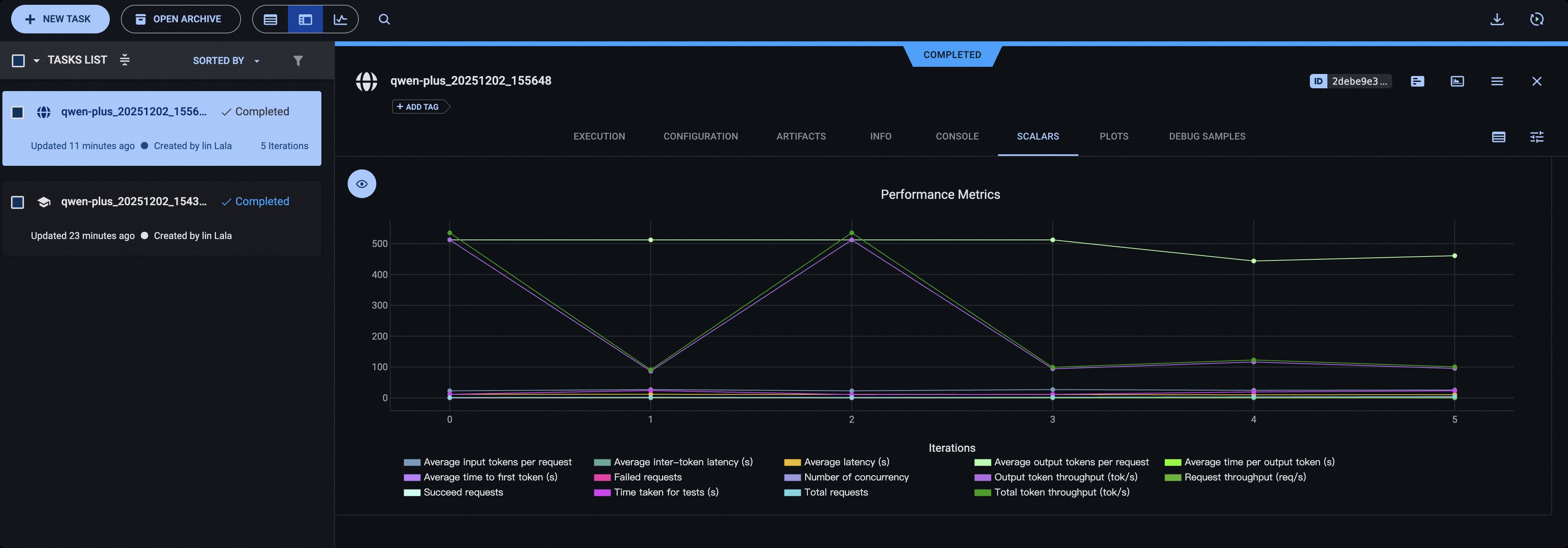
ClearML
Install ClearML:
pip install clearml
Initialize the ClearML server:
clearml-init
Add the following parameters before starting the test:
# You can use the CLEARML_PROJECT_NAME environment variable to specify the project name
--visualizer clearml
--name 'name_of_clearml_task'